· 5 min read
Why muting the center channel of a 5.1 mix does not remove the dialogue
Muting the center looks like a quick way to remove dialogue from a 5.1 film. Here is why speech stays in other channels and why music and effects disappear together with the center.
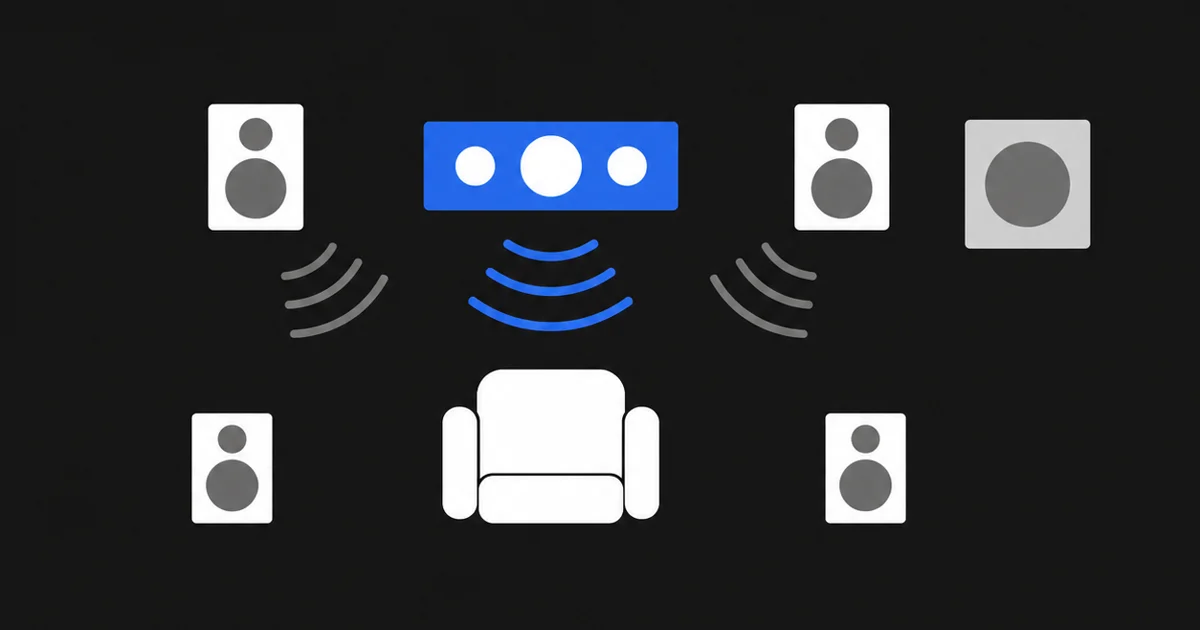
There is a popular piece of advice: “In 5.1, all the speech is in the center channel. Turn it off and the voices are gone.” The advice almost works, and that is exactly why it is dangerous: in the first minutes of the film everything seems fine, and the problems come up in the scenes that matter most. Let us look at how 5.1 sound is built and what really happens when you remove the center.
How 5.1 sound is built
A 5.1 track has six channels:
| Channel | Where it plays | What it usually holds |
|---|---|---|
| L and R | Left and right of the screen | Music, effects, sound moving across the screen |
| C | In the center, behind the screen | The main dialogue, sounds in the center of the frame |
| LFE | Subwoofer | The lowest frequencies: explosions, hits, rumble |
| Ls and Rs | Rear left and right | Ambience, music, effects around the viewer |
Sound engineers really do put the main dialogue in the center channel: this keeps the voice tied to the screen wherever the viewer sits. Hence the idea: if the voice is in the center, then without the center you get the film without the voice.
What stays in the other channels
The center holds the main dialogue, but not all of it. The original voice stays in the other channels in several typical cases:
- Echo and space. The reverb of a voice in a hall, a cave or a street is usually spread over the side and rear channels. Without the center you are left with “an echo without a voice”, and it is clearly audible under the dub.
- Voices away from the center. A character speaks offscreen, over a radio, from far away or from the edge of the screen: the sound engineer often places such lines in L, R or the rears.
- Shouts and crowds. Crowd noise, shouts in battle and voices in the background of a scene are usually spread over all the channels.
- Upmixed sound. If the film was mixed in stereo and the 5.1 was made from it automatically, the speech ends up in several channels at once. This often happens with old films and series.
In all these places, once the center is removed, the original will be heard under the new voices. And these are exactly the scenes with emotion and action, where the viewer notices anything out of place fastest.
What is lost along with the center
The second problem is the opposite one: the center channel holds more than speech.
- Effects in the frame. A gunshot, a slammed door, the footsteps of the hero in the center of the frame often play from the center. Without it they get quieter or disappear.
- Music. In many modern mixes, music also plays partly from the center. Without it the music loses its middle and sounds “hollow”.
- Balance in a stereo downmix. When 5.1 is downmixed to stereo for a TV or a phone, the center is mixed into both channels. Without the center, the stereo version sounds different too.
So removing the center at the same time leaves some of the voices and takes away some of the sound you need.
How to do it right
The reliable way is to remove speech where it actually plays and leave everything else alone. To do that, each channel is separated on its own: a neural network trained on film sound finds the speech, music and effects in it. The voice is removed from the center and from the side channels, and the effects and music stay in their places in every channel.
This is how DubStem works: in 5.1 the program separates the five channels one by one and leaves the subwoofer channel as it is, because there is no speech in it. The output is a no voice track in the same 5.1 layout as the source.
It is worth deciding separately where to run the extra line cleanup. By default DubStem cleans only the center channel: that is where the main dialogue plays, and the singing in the music on the sides is not affected. If the film has a lot of speech on the sides, for example in offscreen lines or in crowds, you can turn on cleanup of all channels in the settings.
How to check your film quickly
Before deciding whether you need the center, listen to the channels one at a time:
- Open the 5.1 track in any audio program that shows the channels.
- Find a scene with shouting or a crowd and a scene with an offscreen line.
- Play only the left and right channels, then only the rear ones.
If you hear speech in these scenes, removing the center will not give you a clean no voice track. If you do not, you are lucky, but still check the effects in the center before you turn it off.
More on why separation also misses part of the voice and how to deal with it in the article why shouts survive voice separation and how to remove them.
We show the program on a call and open 7 days of full access