For dubbing and voiceover studios
No original voices under your dub
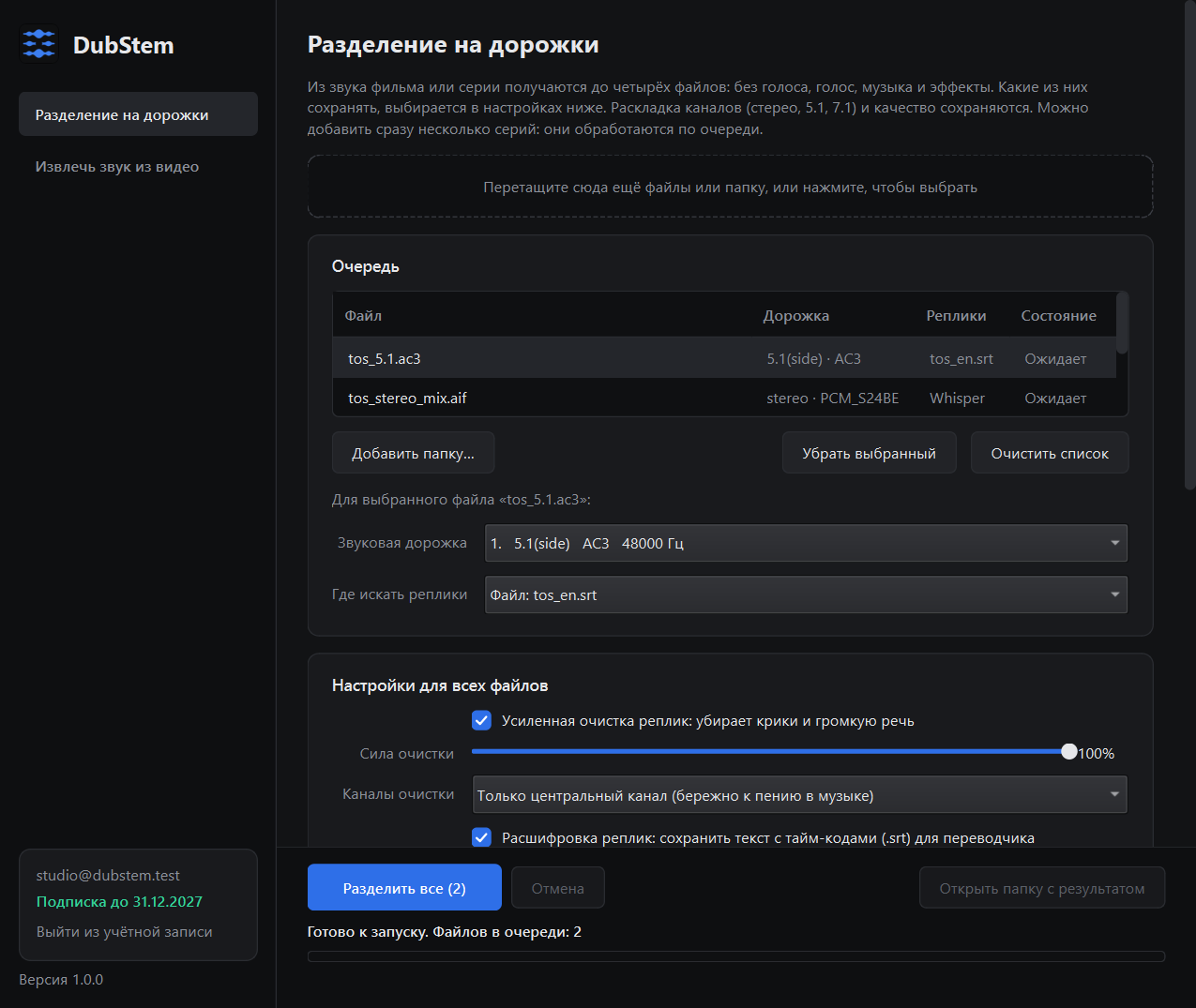
DubStem splits the sound of a film or episode into four files: no voice, voice, music and effects. Shouts and loud lines that usually stay in the background get a separate cleanup pass.
We show the program on a call and open 7 days of full access
Measured on the open film Tears of Steel: in 0 lines out of 76 the voice in our track is at most 3 dB louder than in the official track without dialogue.
Accepted files
- MP4
- MKV
- MOV
- AVI
- TS
- M2TS
- WEBM
- WAV
- AIFF
- FLAC
- MP3
- AAC
- M4A
- AC3
- EAC3
- DTS
- MKA
- OGG
- OPUS
Hear the difference
Clips from the open film Tears of Steel. Switch versions during playback: the sound keeps playing, only the track changes.
The film sound together with the actors’ voices.
Tears of Steel (CC) Blender Foundation, mango.blender.org. Licensed under CC BY 3.0. Audio processed with DubStem.
The problem
Why the original voices come through under a dub
Neural networks for audio separation remove calm speech well. They do worse with shouts, whispers and lines spoken over music: part of the voice stays in the music and effects track.
Under the new voice track the viewer hears fragments of the original. The studio has to clean them out by hand or release the film as it is.
DubStem
What DubStem does
The program knows where each line is spoken: it takes this from the subtitles or finds the speech itself.
In those places it runs a second pass and cleans up what is left of the voice. The sound between lines stays untouched.
What the studio gets
A ready base for dubbing without manual cleanup
Clean where people shout
A second pass over each line removes the shouts and loud speech that stay after ordinary separation.
Stereo and 5.1, as in the source
Channel layout, sample rate and bit depth are kept. Output is WAV 24 bit, WAV 32 bit float or FLAC.
A season in one run
Add a folder of episodes and they are processed one after another. Subtitles with the same name are picked up automatically, and an error in one episode does not stop the rest.
Files stay in the studio
All processing runs on your computer. Only the subscription check goes over the internet. Audio and video are never sent anywhere.
Line text for the translator
Tick a box and an .srt file with the original lines and timecodes appears next to the tracks.
How it works
Three steps from source to tracks
- 1
Add files
A film, an episode or a whole folder. MP4, MKV, MOV, WAV, AC3 and other formats work.
- 2
Click “Split”
A film of 2 hours in 5.1 took 59 minutes on an RTX 3080, including finding the lines and transcription.
- 3
Collect the tracks
No voice, voice, music and effects appear next to the source. Only the files you ticked are saved.
Numbers from our measurements
- output tracks: no voice, voice, music, effects
- 0
- output tracks: no voice, voice, music, effects
- for a film of 2 hours in 5.1 on an RTX 3080, all passes included
- 0 min
- for a film of 2 hours in 5.1 on an RTX 3080, all passes included
- Tears of Steel lines within 3 dB of the official track without dialogue
- 0 of 76
- Tears of Steel lines within 3 dB of the official track without dialogue
- of audio and video sent to the internet
- 0 bytes
- of audio and video sent to the internet
Pricing
One subscription for the whole studio
$200 per month or $2000 per year. No limit on the number of films and episodes. The first 7 days are free.
Common questions
All questions and answers- Nowhere. All processing runs on your computer. The program contacts our server only to check the subscription. Audio and video are not sent.
- Yes. At launch and before each file the program checks the subscription. If the connection drops during processing, the current file is finished, and the check repeats on its own every 20 seconds.
- NVIDIA GeForce RTX 20, 30 or 40 series, with at least 4 GB of video memory, 6 GB or more is better. RTX 50 series graphics cards are not supported yet. To see how long processing takes on your card, open the speed page.
- Not yet. For now the program runs only on Windows with an NVIDIA graphics card.
- The subscription is linked to a studio computer the first time you sign in on it. We agree on the number of computers when your studio joins.
- The program finds the speech itself with Whisper recognition. This takes longer than with subtitles, but the result is of the same kind.
Try it on your own material
Write to us: we show the program on a call, answer your questions and open trial access for 7 days.